 Mukesh@gmail.com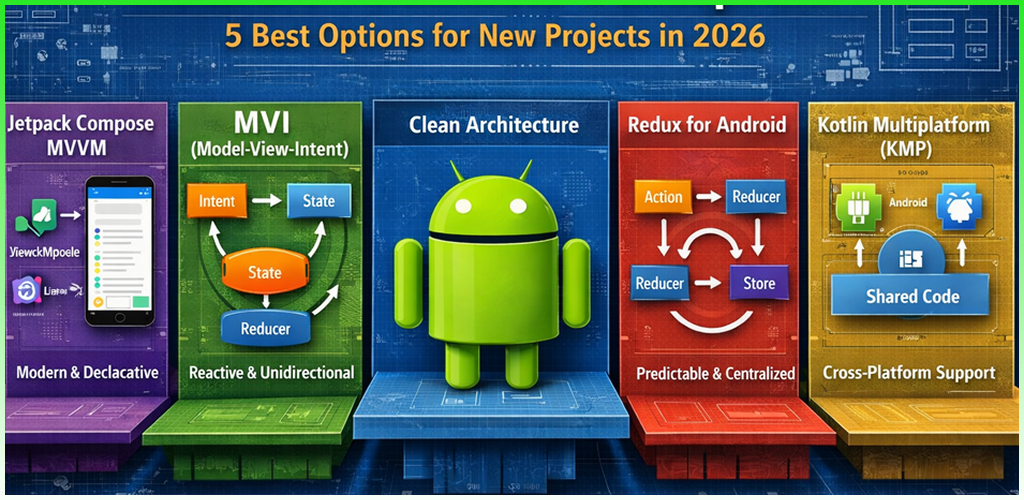
Starting a new Android project in 2026 comes with a real decision to make before writing a single line of feature code: how are you going to structure this thing?
The Android architecture blueprint you choose shapes everything — how easy it is to add features, how painful debugging becomes, how quickly new team members get up to speed. Making that choice based on random tutorials or whatever you used in your last project isn’t a good strategy. This guide reviews five of the most widely used and recommended Android architecture blueprints — with honest assessments of what each one is good for, where it struggles, and who should actually consider it.
What Makes an Android Architecture Blueprint “Good”?
Before comparing blueprints, it’s worth defining what we’re actually looking for. A solid Android architecture blueprint for a new project should be maintainable as the app grows, support testability without excessive setup, align with current Android tooling like Jetpack Compose, Coroutines, and Hilt, be understandable by developers at different experience levels, and have active community support and documentation.
With those criteria in mind, here are the five blueprints worth knowing in 2025.
Blueprint 1 – MVVM With Jetpack (The Standard)
Best for: Most new projects, solo developers, and small teams
MVVM — Model-View-ViewModel — paired with Jetpack libraries is the baseline modern Android architecture blueprint. It’s Google’s official recommendation, and for good reason.
The structure is straightforward. ViewModels hold and expose UI state via StateFlow or LiveData. Composables observe that state and render accordingly. Repositories handle data access. Everything is wired together with Hilt.
What’s Good
The learning resources are excellent. Google’s own architecture samples repository demonstrates MVVM in real, production-quality code. The community is massive, so finding answers to specific problems is rarely difficult.
Integration with Jetpack Compose is seamless. StateFlow and collectAsState() make the ViewModel-to-Composable connection minimal and clean. Testing is solid too — ViewModels are easy to unit test because they have no Android lifecycle dependencies when tested in isolation.
What’s Not So Good
On complex screens with many concurrent interactions, managing multiple separate StateFlow values in the ViewModel can get messy. It’s possible to end up with inconsistent state between different flows if you’re not disciplined about it.
MVVM also doesn’t enforce a strict event-handling pattern. Different developers on the same team might handle user actions differently, leading to inconsistency across the codebase.
Verdict
Rating: 9/10 for new projects. If you’re starting something new and want a solid, well-documented, community-supported Android architecture blueprint — start here. Add Clean Architecture layering on top for anything beyond a simple app.
Blueprint 2 – MVI With Clean Architecture (The Scalable Choice)
Best for: Complex apps, large teams, apps expected to grow significantly
MVI — Model-View-Intent — takes the principles of MVVM and adds strict unidirectional data flow. Each screen has one UI state object and receives user actions as typed “intents.” The ViewModel processes intents and emits complete new states.
Combined with Clean Architecture layering — Data, Domain, and UI layers with Use Cases — this is the most structured Android architecture blueprint available today.
What’s Good
The predictability is exceptional. When every user action is a typed intent and every screen state is a single object, debugging becomes almost mechanical. You find the intent that caused the wrong state, then fix the ViewModel logic. Done.
Scalability is genuinely impressive. Teams of 10 or more developers can work on different features simultaneously with minimal conflicts because the architecture enforces clear boundaries between concerns.
Testing is a real pleasure with this Android architecture blueprint. Each ViewModel function processes one intent and produces one state — straightforward to write assertions against.
What’s Not So Good
The setup cost is real. Defining intent sealed classes, state sealed classes, and Use Cases for every feature before writing any actual feature logic feels slow at first, especially on smaller projects.
It’s not beginner-friendly. Developers new to Android architecture need to understand sealed classes, coroutines, dependency injection, and Clean Architecture layers before MVI starts making sense.
Verdict
Rating: 8.5/10 for new projects with growth expectations. If you’re building something intended to last years and scale significantly, this Android architecture blueprint is worth the upfront investment. For simple or solo projects, it may be overkill.
Blueprint 3 – Now in Android (Google’s Reference App)
Best for: Developers who want to see all modern practices combined in one place
Now in Android is Google’s official sample application that demonstrates how all modern Jetpack and architecture recommendations work together in practice. It’s not a pattern in itself — it’s a reference implementation of a complete Android architecture blueprint.
The app uses Jetpack Compose, Hilt, Coroutines, Kotlin Flow, Room, Retrofit, and more. The architecture follows Clean Architecture principles with MVVM in the presentation layer.
What’s Good
Seeing all these technologies working together in a single real app is genuinely valuable. It answers the question “how do I connect all these pieces?” in the most concrete way possible — working, readable code.
The project is maintained by Google, so it reflects current best practices rather than outdated approaches. It covers things like offline support, navigation with Compose, and proper error handling — aspects of real apps that simple tutorials often skip entirely.
What’s Not So Good
It’s dense. For a beginner, reading through Now in Android can be overwhelming because there are so many things happening at once in every layer.
Using it as a direct template for your own app requires significant adaptation — it’s a news app specifically, and the features are platform-announcement-specific. It’s better studied than copied.
Verdict
Rating: 8/10 as a learning and reference resource. Not a standalone Android architecture blueprint you adopt wholesale, but invaluable for understanding how modern practices fit together. Study it before starting a new project, not as the project template itself.
Blueprint 4 – Modular Architecture (The Enterprise Approach)
Best for: Large teams, apps with many distinct features, projects targeting faster build times
Modular architecture isn’t a replacement for MVVM or MVI — it’s an organizational layer on top. The idea is to split your app into multiple Gradle modules, each responsible for one feature or layer.
You might have a :feature:profile module, a :feature:search module, a :core:data module, and so on. Each module compiles independently. Modules depend on each other through defined interfaces. This Android architecture blueprint shines at scale.
What’s Good
Build times improve significantly on large codebases. When you change something in :feature:search, only that module needs to recompile — not the entire app. On big projects, this alone saves hours per week across a team.
Team scalability improves meaningfully. Different teams can own different modules without constantly conflicting on the same files. Feature isolation also makes testing much cleaner — a feature module can be tested completely independently.
What’s Not So Good
The setup complexity is significant. Defining module boundaries correctly, managing inter-module dependencies, and configuring Hilt across multiple modules requires real experience with Android build systems.
For small apps or solo developers, this Android architecture blueprint adds overhead without meaningful benefit. You’re managing module dependencies and build configurations for problems you don’t actually have yet.
Verdict
Rating: 7/10 for most new projects, 9/10 for large teams. Don’t start with modular architecture unless your team and app size genuinely warrant it. Design your app to be modularizable from the start, but hold off on actually creating the modules until complexity demands it.
Blueprint 5 – Single-Activity Architecture With Compose Navigation
Best for: New apps built entirely in Jetpack Compose
This is less of an architecture pattern and more of a structural decision, but it’s worth including in any Android architecture blueprint review because it fundamentally affects how your project is organized from day one.
The traditional approach was multiple Activities, each managing its own UI and lifecycle. Modern Compose-first development tends toward a single Activity that hosts a NavHost — Compose Navigation’s container for all screens. All screens are Composables. There are no Fragments in most cases.
What’s Good
Simplicity is a major advantage. One Activity means one lifecycle to manage, one place where your top-level app decisions happen, and no back-stack complexity across Activity boundaries.
Compose Navigation integrates cleanly with ViewModel and Hilt. Each Composable destination can have its own scoped ViewModel. Deep linking, bottom navigation, and drawer navigation are all handled by the same Navigation Component, keeping navigation logic consistent throughout the app.
What’s Not So Good
Transitioning an existing app with multiple Activities to single-Activity architecture is a significant migration. This Android architecture blueprint is best applied to brand new projects.
Some use cases — like system-level features, widgets, or Android TV — still require separate Activities. The single-Activity approach works best for standard phone apps.
Verdict
Rating: 9/10 for Compose-first new projects. Combine this structural decision with MVVM or MVI and Clean Architecture layering for a complete, modern Android architecture blueprint foundation.
How to Choose: A Practical Decision Framework
After reviewing all five options, here’s a simple way to decide which Android architecture blueprint fits your situation.
If you’re a solo developer building a simple app, go with MVVM and Jetpack in a single-Activity Compose structure. It’s clean, well-documented, and fast to set up. If you’re a small team expecting growth, MVI with Clean Architecture on top of single-Activity Compose is worth the upfront investment. For a large team building an enterprise app, modular architecture with MVI and Clean Architecture becomes necessary for team scalability and build performance.
If you’re still learning modern Android development, study Now in Android thoroughly before writing a line of production code. It will save you from making architectural mistakes that are expensive to undo later.
For a deep dive into Jetpack Compose’s role in modern architecture, the Android Jetpack Compose documentation is the essential reference. And for understanding Clean Architecture principles applied to Android specifically, the Android Architecture Guide covers the official recommendations in detail.
If you’re comparing MVVM and MVI in more depth before making your decision, our Android ViewModel and LiveData beginner guide is a solid starting point. And for teams considering modular architecture, our Android Gradle module setup guide walks through the configuration step by step.
Final Conclusion
There’s no single “best” Android architecture blueprint — the right choice depends on your app’s complexity, your team’s size, and your growth expectations. What all five blueprints share is a commitment to separation of concerns, testability, and alignment with modern Jetpack tooling.
MVVM with Jetpack is the practical starting point for most projects. MVI with Clean Architecture is where complex apps need to go. Modular architecture handles the scale that large teams genuinely require. Single-Activity Compose structure is the modern default for new Compose-first projects. And Now in Android remains the best single resource for understanding how every piece fits together.
Pick the Android architecture blueprint that matches where your app is going — not just where it starts.