 Mukesh@gmail.com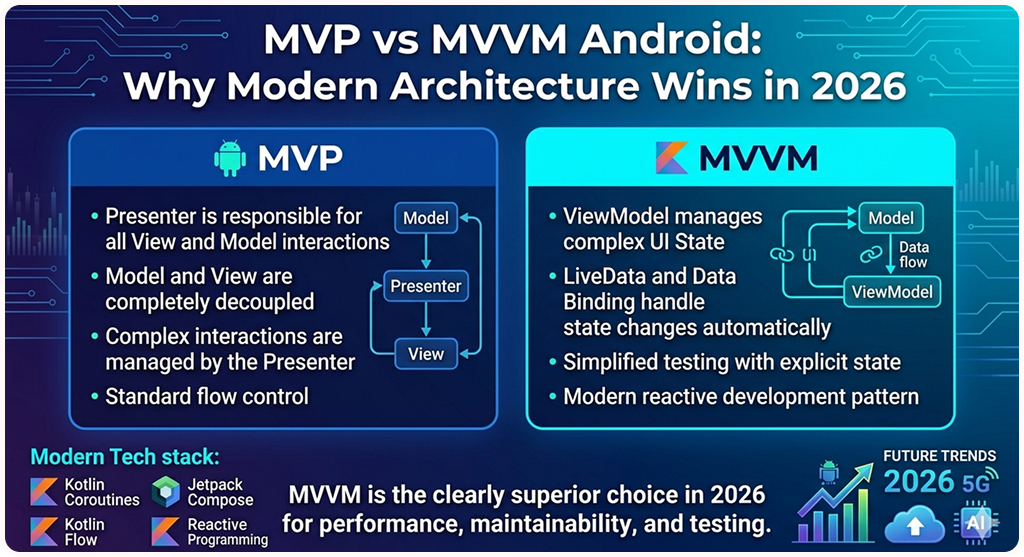
Android development has changed a lot over the last few years. If you’ve been building apps for a while, you’ve probably used MVP — Model-View-Presenter — at some point. Maybe it worked fine back then. But in 2025, continuing to use MVP as your go-to architecture is a bit like using a 2015 Android phone and wondering why apps feel slow. It still works, technically. But you’re leaving a lot on the table.
The MVP vs MVVM Android debate isn’t really a debate anymore among experienced developers — modern architecture has moved on. This guide breaks down why MVP has quietly become outdated, what modern Android architecture actually looks like today, and what you should be using instead — especially if you’re just getting started or trying to grow as a developer.
What MVP Actually Is and Why It Made Sense Before
MVP stands for Model-View-Presenter. The core idea is simple: you separate your UI — the View — from the logic that controls it — the Presenter — and you keep data handling in its own Model layer.
Back when Android development was messy and Activity classes were handling everything — network calls, button clicks, database reads — MVP felt like a breath of fresh air. It gave structure to chaos. Developers could test Presenters without touching the UI directly. That was genuinely useful.
But Android itself has changed dramatically since MVP became popular. When you look at MVP vs MVVM Android today, the tools we have now are simply better suited for the problems we actually face in real projects.
The Real Problems With MVP in 2026
The Presenter Doesn’t Survive Configuration Changes
Here’s something that trips up a lot of beginners in the MVP vs MVVM Android conversation: when you rotate your phone, Android destroys and recreates the Activity or Fragment. If your Presenter lives inside that Activity, it gets destroyed too.
You can work around this — and developers have been working around it for years. But workarounds have a cost: extra code, extra testing, extra things that can break unexpectedly.
ViewModel, which is part of Android Jetpack, handles configuration changes automatically. It survives rotation out of the box. No special setup, no manual state saving for most cases. That alone is a compelling reason in the MVP vs MVVM Android comparison.
The View Interface Boilerplate Is Tedious
In a typical MVP setup, you define an interface for your View. Every screen needs one. Every method the Presenter wants to call — show a loading spinner, display an error, populate a list — needs to be declared in that interface.
For small apps, it’s manageable. For anything real-world with a dozen screens, it becomes enormous amounts of code that doesn’t do much except exist and get maintained.
Modern approaches with Jetpack Compose and unidirectional data flow eliminate this entirely. The UI just observes state. No contract interfaces needed. That simplification is one of the clearest wins in the MVP vs MVVM Android comparison.
Testing Presenters Isn’t as Straightforward as Promised
One of MVP’s biggest selling points was testability. In theory, you could unit test your Presenter without an Android device or emulator.
In practice, Presenters often end up depending on Android-specific things anyway. When they do, your clean unit test suddenly needs extensive mocking and workarounds that defeat the original purpose.
With ViewModels and coroutines — the MVVM side of the MVP vs MVVM Android debate — testing is more natural and better integrated with the overall Jetpack ecosystem from day one.
What Modern Android Architecture Looks Like in 2026
MVVM With Jetpack Is the Baseline
Model-View-ViewModel has been Google’s recommended approach for several years now, and it’s matured significantly. In 2025, it’s not just recommended — it’s the practical standard for new Android projects.
The ViewModel holds UI state. The View — your Activity, Fragment, or Composable — observes that state using LiveData or StateFlow. When something changes, the ViewModel handles the logic and emits a new state. The UI renders whatever state it receives.
kotlin
@HiltViewModel
class ContactsViewModel @Inject constructor(
    private val getContactsUseCase: GetContactsUseCase
) : ViewModel() {

    private val _uiState = MutableStateFlow<ContactsUiState>(ContactsUiState.Loading)
    val uiState: StateFlow<ContactsUiState> = _uiState.asStateFlow()

    init {
        loadContacts()
    }

    private fun loadContacts() {
        viewModelScope.launch {
            try {
                val contacts = getContactsUseCase()
                _uiState.value = ContactsUiState.Success(contacts)
            } catch (e: Exception) {
                _uiState.value = ContactsUiState.Error(e.message ?: "Something went wrong")
            }
        }
    }
}

sealed class ContactsUiState {
    object Loading : ContactsUiState()
    data class Success(val contacts: List<Contact>) : ContactsUiState()
    data class Error(val message: String) : ContactsUiState()
}
This one-directional flow makes bugs easier to track. You always know where state comes from — a decisive advantage when settling the MVP vs MVVM Android question for yourself.
MVI Is Gaining Ground for Complex Screens
Model-View-Intent takes things a step further. Instead of the View calling multiple methods on the ViewModel, the View sends a single typed “intent” — basically a description of a user action — and the ViewModel produces a completely new UI state in response.
Think of it this way: every time something happens on screen, you describe it clearly. “User clicked login button.” The ViewModel receives that intent, processes it, and sends back the full picture of what the screen should look like right now.
For complex screens with lots of interactions — a checkout flow, a multi-step form, a real-time search — MVI makes the logic dramatically easier to reason about compared to either side of the MVP vs MVVM Android debate.
You can read more about state management patterns in the official Android architecture guide, which covers both MVVM and MVI approaches with working examples.
Clean Architecture Is Still the Foundation
Neither MVVM nor MVI replaces Clean Architecture — they sit on top of it. Your Data layer (repositories, data sources) stays separate from your Domain layer (use cases, business logic), which stays separate from your Presentation layer (ViewModels, UI).
This separation is what makes large apps maintainable over time. When a developer joins your team and needs to change how data is fetched, they shouldn’t have to touch the UI code at all. That kind of isolation is simply not possible with MVP structured the way most teams use it — another clear point in the MVP vs MVVM Android comparison.
MVP vs MVVM Android: A Practical Side-by-Side Example
Imagine you’re building a simple screen that loads a list of contacts. Here’s what the MVP vs MVVM Android difference looks like in actual code.
With MVP, you’d write a View interface with methods like showContacts(), showError(), and showLoading(). Your Presenter calls these methods. Your Activity implements them. Two files minimum for the contract alone, plus the Presenter class itself.
With MVVM and Compose, your ViewModel exposes a single ContactsUiState sealed class. Your Composable renders whichever state it receives:
kotlin
@Composable
fun ContactsScreen(viewModel: ContactsViewModel = hiltViewModel()) {
    val uiState by viewModel.uiState.collectAsState()

    when (uiState) {
        is ContactsUiState.Loading -> CircularProgressIndicator()
        is ContactsUiState.Success -> ContactsList(
            contacts = (uiState as ContactsUiState.Success).contacts
        )
        is ContactsUiState.Error -> ErrorMessage(
            message = (uiState as ContactsUiState.Error).message
        )
    }
}
No interface. No method calls bouncing back and forth. Less code, clearer logic, easier to test. That’s the MVP vs MVVM Android difference made completely concrete.
Jetpack Compose Changes the Conversation Entirely
It’s hard to discuss MVP vs MVVM Android in 2025 without talking about Compose. Google’s declarative UI toolkit is no longer “the new thing” — it’s the standard for new projects and increasingly for migrated ones too.
With Compose, your UI is literally a function of state. You describe what the screen should look like for a given state, and Compose figures out how to render it efficiently. There’s no manual “update this TextView when data arrives” code anywhere.
This fits perfectly with MVVM and MVI. Your ViewModel holds the state, your Composable renders it. When state changes, Compose re-renders only the relevant parts automatically. MVP’s View interface pattern has no natural place in this model — which is perhaps the strongest argument in the MVP vs MVVM Android debate.
When MVP Might Still Be Acceptable
The MVP vs MVVM Android conversation isn’t about declaring MVP completely useless in every situation. If you’re maintaining a large legacy codebase that’s heavily invested in MVP, migrating everything at once isn’t realistic or advisable. Gradual migration is completely fine and often the smarter approach.
Also, if you’re learning architecture patterns for the very first time, understanding MVP isn’t wasted effort. It teaches you why separation of concerns matters. It gives you a historical foundation for understanding why MVVM was designed the way it is.
But starting a brand new Android project in 2025 with MVP as your primary architecture? That’s where the MVP vs MVVM Android answer becomes clear. You’d be choosing a solution designed for problems that have already been solved better by the tools that exist today.
Practical Advice for Developers Making the Switch
If you’re coming from MVP and want to move toward modern architecture, here’s how to approach it without getting overwhelmed by the MVP vs MVVM Android transition.
Start with ViewModel. Even before learning anything else, replacing your Presenters with ViewModels is a meaningful first step. You’ll immediately notice how much simpler configuration change handling becomes — no workarounds, no saved state gymnastics for most cases.
Learn StateFlow. This is how your ViewModel communicates with the UI in modern Android. If you’re unfamiliar with reactive programming, LiveData has a gentler learning curve as a starting point before moving to StateFlow.
Pick up Compose gradually. You don’t have to rewrite your entire UI at once. Compose and traditional Views can coexist in the same app. Add Compose to new screens while keeping existing screens as-is until you’re comfortable.
Add Hilt for dependency injection. Once your architecture is set up, Hilt makes it much cleaner to wire everything together without manually passing dependencies around — a pattern you’ve probably experienced the pain of in MVP projects.
For a deeper look at how ViewModel and StateFlow connect in practice, our Android ViewModel LiveData beginners guide covers the transition clearly. And for teams ready to adopt Clean Architecture on top of MVVM, our Clean Architecture Android guide explains how the layers fit together in the MVP vs MVVM Android modern context.
For official guidance on migrating from MVP to modern architecture, the Android architecture recommendations page is the most up-to-date reference available.
Final Conclusion
The MVP vs MVVM Android comparison in 2025 ultimately tells a clear story. MVVM with Jetpack, MVI for complex flows, Clean Architecture as the structural foundation, and Compose for the UI — these aren’t just trendy choices. They’re the result of years of real-world feedback from developers building real apps at real scale.
MVP served its purpose. It made Android development more structured at a time when the ecosystem genuinely needed that structure. But the ecosystem has evolved significantly, and the tools available now solve the same problems with less friction, less boilerplate, and better long-term maintainability.
If you’re building something new, the MVP vs MVVM Android answer is straightforward — skip MVP. Not because it’s fundamentally wrong, but because something better exists. Using modern architecture will make your development experience noticeably smoother, your codebase easier to maintain, and your apps more reliable for the users who depend on them.